Possibly the coolest and easiest dash cam install ever

You need the hard-wired harness.

Thanks! I didn't see this when I ordered.
 
. . .finally bit the bullet and got mine - took less than 2 weeks from Amazon to arrive!
- install and wiring connection was easy-peasy and straight forward with 0 issues
- took me longer to re-install and level my BlendMount for my R8 radar detector
- swapped out the 64GB KIOXIA memory card that came with it, with a SanDisk 128GB Extreme microSDXC UHS-I memory card

NOTE: I ended up downloading and using the FitDVR instead of the FITCAMX app.. based upon what I read about FitDVR being the newer app. the manufacture has put out. - using it on iPhone 13 Pro Max. The FitDVR app is very intuitive and simple to use.

Bottom line, thus far, both camera and its video/audio quality (which I have both set at the highest settings) & app are working flawlessly.

 
Last edited:
1st of all- you def dont wanna go cheap on the Sd. I purchased a SanDisk 128GB Extreme microSDXC UHS-I and it has worked well. I've used the same class/etc SDcard in my GoPro Hero 11 also without issue. However, my FitCamX came with a 128gb (some no name brand) already installed in it! I'm keeping as a spare so when I go on a long off road trip, I can swap it out to capture the 2nd half of the trip b4 overwriting the 1st

That’s a good card, worked for Enterprise Storage Companies for 20+ years, including WDC. Better memory cards (and flash SSDs) have extra cells to account for cells that go bad..
 
. . .finally bit the bullet and got mine - took less than 2 weeks from Amazon to arrive!
- install and wiring connection was easy-peasy and straight forward with 0 issues
- took me longer to re-install and level my BlendMount for my R8 radar detector
- swapped out the 64GB KIOXIA memory card that came with it, with a SanDisk 128GB Extreme microSDXC UHS-I memory card

NOTE: I ended up downloading and using the FitDVR instead of the FITCAMX app.. based upon what I read about FitDVR being the newer app. the manufacture has put out. - using it on iPhone 13 Max. The FitDVR app is very intuitive and simple to use.

Bottom line, thus far, both camera and its video/audio quality (which I have both set at the highest settings) & app are working flawlessly.
I've been using mine for a few months now with no issues at all!
 
. . .finally bit the bullet and got mine - took less than 2 weeks from Amazon to arrive!
- install and wiring connection was easy-peasy and straight forward with 0 issues
- took me longer to re-install and level my BlendMount for my R8 radar detector
- swapped out the 64GB KIOXIA memory card that came with it, with a SanDisk 128GB Extreme microSDXC UHS-I memory card

NOTE: I ended up downloading and using the FitDVR instead of the FITCAMX app.. based upon what I read about FitDVR being the newer app. the manufacture has put out. - using it on iPhone 13 Max. The FitDVR app is very intuitive and simple to use.

Bottom line, thus far, both camera and its video/audio quality (which I have both set at the highest settings) & app are working flawlessly.
where did you see that FitDVR is a newer app - the appstore?
 
where did you see that FitDVR is a newer app - the appstore?
. . .
1679969995011.png

where did you see that FitDVR is a newer app - the appstore?
 
2 1/4 stars, that's like a death sentence on the App Store.
 
It’s probably been answered but I don’t feel like scrolling through 20 pages to find the answer… does this require Wi-Fi to work?
My last dash cam (Nexar) required a constant Wi-Fi connection from my phone to work which inhibited use of wireless CarPlay.
 
It’s probably been answered but I don’t feel like scrolling through 20 pages to find the answer… does this require Wi-Fi to work?
My last dash cam (Nexar) required a constant Wi-Fi connection from my phone to work which inhibited use of wireless CarPlay.
It's a strange setup. I originally commented that I could not use the Fitcamx app and used another app. I got the Fitcamx app to work. So, you need to connect initially to your Wi-Fi network while your trick is near your house To get things set up. Then for androids I had to turn on a setting on my cell phone to allow switching to cell service when not at home. finally I also had to turn on a setting to allow the Fitcamx app to always seek permission when I want to view it on my phone. I have had it working for 3 weeks now and it seems to work fine if what I said made sense. Good luck!
 
It’s probably been answered but I don’t feel like scrolling through 20 pages to find the answer… does this require Wi-Fi to work?
My last dash cam (Nexar) required a constant Wi-Fi connection from my phone to work which inhibited use of wireless CarPlay.
. . .for iPhone's, you have to download their app. The only times you have to use WiFi on your phone is to connect directly to the camera to adjust the settings (video/audio/loop...etc.) AND to review the videos while in your truck. The camera records non-stop and in timed loops (set by you) and will over-right in chronological order (old - new) once the memory card is full. It's easier for me to remove the memory card and upload the videos to my laptop through one of the ports.
 
Last edited:
Hey guys,


Has anyone installed the parking mode yet. Just got my cable in but no instructions.
 
I’ve had mine installed for a while but I’m thinking of getting it hardwired. Has anyone had any problems with the battery after getting the cam hardwired?
 
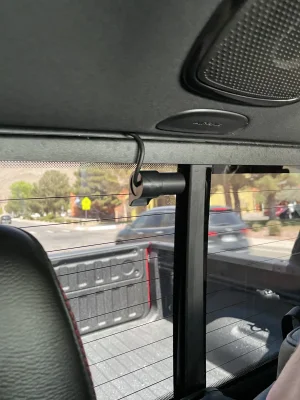
So being lazy and not wanting to dig through 20 pages, did anybody do a rear camera install? I’m curious how that looks.
 
So being lazy and not wanting to dig through 20 pages, did anybody do a rear camera install? I’m curious how that looks.
Got it done yesterday. I’ll post a pic when I get a chance
 

Attachments

  • 2F15C692-9AA0-4942-98A0-79F18E5CF91D.webp
    2F15C692-9AA0-4942-98A0-79F18E5CF91D.webp
    197.6 KB · Views: 154

TRX Forum Favs 👍

Back
Top