Possibly the coolest and easiest dash cam install ever

Does anyone know of a 8 pin "bullet" type camera that will work in place of the stock rear?

I bought the front and rear kit, Installed the front in under 5 minutes.

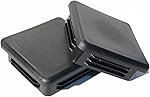
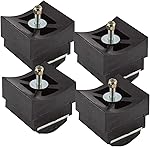
I ran the rear all the way to the back bumper... I found a spot for the rear cam,(It's the little pop out panel for lowering the spare) and I just installed it... But the swivel mount that allows for adjustment, is a bit cumbersome.... A flush mount bullet cam would be PERFECT in this spot.


If I find a compatible 8 pin bullet mount cam.. I can just mount it in that pop-out panel.
 
Last edited:
Does anyone know what format the sd card needs to be? NTFS, fat32, etc… I am purchasing a larger one and want to make sure it’s formatted correctly.

Your computer can format an SD card to either FAT32 or NFTS depending on what the device needs. You'll select that as an option when you format it. If someone is selling you a "FAT32" SD card, they're full of shit.
 
Does anyone know of a 8 pin "bullet" type camera that will work in place of the stock rear?

I bought the front and rear kit, Installed the front in under 5 minutes.

I ran the rear all the way to the back bumper... I found a killer spot for the rear cam, and I just installed it... But the swivel mount that allows for adjustment, is a bit cumbersome.... A flush mount bullet cam would be PERFECT in this spot.

And by chance.... Does anyone know a part number for this?

If I find a compatible 8 pin bullet mount cam.. I'll be grabbing another one of these, and center it easily.

It's the little pop out panel, just to the right of the trailer plug.

View attachment 101621
Bump for the day crew!
Does anyone know of a 8 pin "bullet" type camera that will work in place of the stock rear?

I bought the front and rear kit, Installed the front in under 5 minutes.

I ran the rear all the way to the back bumper... I found a spot for the rear cam,(It's the little pop out panel for lowering the spare) and I just installed it... But the swivel mount that allows for adjustment, is a bit cumbersome.... A flush mount bullet cam would be PERFECT in this spot.


If I find a compatible 8 pin bullet mount cam.. I can just mount it in that pop-out panel.
Bump for the day crew!
 
Which software are you guys using? I have a Note20 and the software isn't working for me! it worked the first time in wifi mode and now I can't get it to sink up :(
 
Which software are you guys using? I have a Note20 and the software isn't working for me! it worked the first time in wifi mode and now I can't get it to sink up :(
I'm using Viddure, works perfectly on IOS..... Keep in mind, there is really no reason to use a mobile app... except possibly aiming your rear cam.

If you have an incident.... and you're a long way from home... Just pop out the memory card, and download the footage to your PC when you get home..
 
I'm using Viddure, works perfectly on IOS..... Keep in mind, there is really no reason to use a mobile app... except possibly aiming your rear cam.

If you have an incident.... and you're a long way from home... Just pop out the memory card, and download the footage to your PC when you get home..
Exactly this. (y)
 
Dash cams are pretty much a necessity nowadays and with how easy this one installs, the quality of it, and even the price, you should definitely check it out. It's made by a company called FitCamX and while I was searching for a good option for the TRX I came across this one and thought I'd give it a try. I was surprised to find that it has the internals of much more expensive dash cams with the quality to go with it. The install is insanely easy and it looks OEM. I have some day and night time video in the video below so if you're looking for a dash cam for your truck, check this out:


You can get yours here: https://amzn.to/3Xq8DW0
PROMO code: RAM1500FITC for 6% off.

If amazon isn't working, you can get it from their site here and save 6% with the following code:

Promo code: HHD6 for 6% off
I did not have great luck with mine, the first one came out with wires that have been outside of one of the connectors, and then one of the round multi pin connectors terminals were slightly bent, and that happened to me twice so I canceled everything and bought a BlackVue

just to be fair, I really wanted that to work, it seems like such a cool deal!
 
I did not have great luck with mine, the first one came out with wires that have been outside of one of the connectors, and then one of the round multi pin connectors terminals were slightly bent, and that happened to me twice so I canceled everything and bought a BlackVue

just to be fair, I really wanted that to work, it seems like such a cool deal!
Very strange. I have installed 4 of these on friends TRX's and many others I know have ordered them without issue. To get 2 in a row that were bad, though... Weird. Did you order from Amazon or their site directly?
 
Very strange. I have installed 4 of these on friends TRX's and many others I know have ordered them without issue. To get 2 in a row that were bad, though... Weird. Did you order from Amazon or their site directly?
Yea that is odd. I’ve done 4 installs too, always flawless.
 
I did not have great luck with mine, the first one came out with wires that have been outside of one of the connectors, and then one of the round multi pin connectors terminals were slightly bent, and that happened to me twice so I canceled everything and bought a BlackVue

just to be fair, I really wanted that to work, it seems like such a cool deal!
Assuming you got a full refund, I'd take another shot at it..... I gave up a cam with more features, that cost more than double what this cost... The ease of installation and how it's basically invisible and looks factory intergrated ... Made it worth it for me to give up some nice features.
 
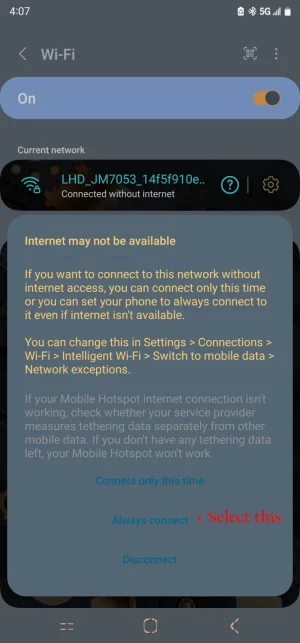
OK, I got mine working Great now! I installed the Viidure app, and it seems to look the same, BUT I think I know where things went wrong? Have a look at my screen shot, it's very hard to read the screen, I think I checked the wrong option, I clicked this time only! you need to click Always!
 

Attachments

  • Screenshot_20230625_160711_Settings-3.webp
    Screenshot_20230625_160711_Settings-3.webp
    70.6 KB · Views: 84
So if you scroll back a page or so.. I was asking questions about a bullet type mount rear cam.... No one responded, So I hit up FitcamX (which was an exhausting 30+ chat exchange)

As far as I can tell... They only produce 2 different rear cams... The 360 degree swivel mount that comes with our front/rear order... Which I couldn't make work in the spot I picked (the knockout panel on the bumper.. for lowering the spare)
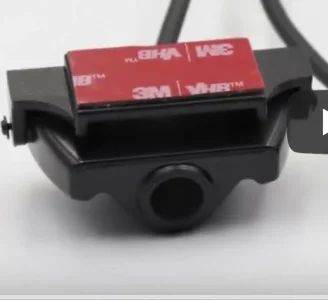
And the other type, which after an exhausting amount of chatting, they finally sent me for $35 (including shipping)

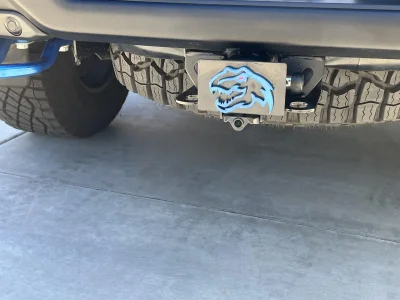
I thought I could mount it in that knockout plate... but it ended up being about 3-4mm's to wide.... So I mounted it under my hitch.

I'm thrilled with the results... You really can't even see it, unless your crouched low near the bumper...

The following pics are:

1. The different style camera from Fitcamx
2. Picture of it mounted.
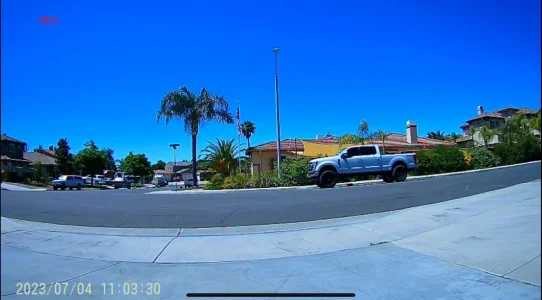
3. A Screenshot off my iphone, from Viddure..... The SS isn't super clear, but the actual video is crystal clear!

If anyone has any questions on how I ran it.... Hit me up.

It's so much better than my Thinkware rear cam, that was mounted in the rear window.. and was mostly catching my tonneau cover.
 

Attachments

  • Fitcam new.webp
    Fitcam new.webp
    9.6 KB · Views: 115
  • rear cam mount.webp
    rear cam mount.webp
    162.3 KB · Views: 108
  • Rear SS save.webp
    Rear SS save.webp
    108.1 KB · Views: 106
Another tidbit….. My buddy was getting ready to order a FITCAMX for his TRX…. I told him to just get the front and order the rear separately (cause the front only is always in stock at Amazon with free shipping) Where as the front and rear, comes from China, and they hit you with a $20 delivery fee)

Good thing he procrastinates….. The front only doesn’t include the board, or pigtail capable of adding a rear later.
 
I tried installing mine last night, everything went fine until I tried setting up the app. Carplay seems to keep overriding my wifi connection to the camera and I can't get the app you used to recognize the camera at all.
 
I tried installing mine last night, everything went fine until I tried setting up the app. Carplay seems to keep overriding my wifi connection to the camera and I can't get the app you used to recognize the camera at all.
disconnect your phone from the car. setup the camera, re-connect and your done. Once its setup, much easier to just take the sdcard out if you need to.
 
disconnect your phone from the car. setup the camera, re-connect and your done. Once its setup, much easier to just take the sdcard out if you need to.
Gotcha, I figured that was going to be the response but wanted to make sure. I had a similar issue with my Power Wagon when I tried to take a conference call with my Air Pods in and the truck kept fighting for control so I had to completely disconnect the phone from Uconnect. Thanks for confirming!
 
This looks great. So which model do I order on Amazon for the TRX, A or B?
 
This looks great. So which model do I order on Amazon for the TRX, A or B?
depends on which system you have. the A model is designed for models without the safety avoidance/adaptive cruise. Check your rearview and compare the photos, buy the model that is the same as yours.
 
depends on which system you have. the A model is designed for models without the safety avoidance/adaptive cruise. Check your rearview and compare the photos, buy the model that is the same as yours.
I think thats backwards, I dont have ACC (level 2 but no other electronic options, and the photo on amazon that matches what mine looks like is B. So I guess A is for the trucks with the ACC etc. Thanks for pointing me in right direction though!
 
I think thats backwards, I dont have ACC (level 2 but no other electronic options, and the photo on amazon that matches what mine looks like is B. So I guess A is for the trucks with the ACC etc. Thanks for pointing me in right direction though!

No, the model A camera is for Big Horns and lower level Laramie's. I believe all TRX's, level 1 and 2, have the large mirror bezel and require the B model camera.
 

TRX Forum Favs 👍

Back
Top