AlfaOBD Tips and Tricks

In all seriousness all the cables just difficult to remove? I was going to use the Amazon link for that one again but didn’t know if another worked better or easier to remove the stock cables from.
 
In all seriousness all the cables just difficult to remove? I was going to use the Amazon link for that one again but didn’t know if another worked better or easier to remove the stock cables from.
If I remember correctly, there is a tab on the 8 and 12 pin connectors that you can break off. Then they won’t lock in.
 
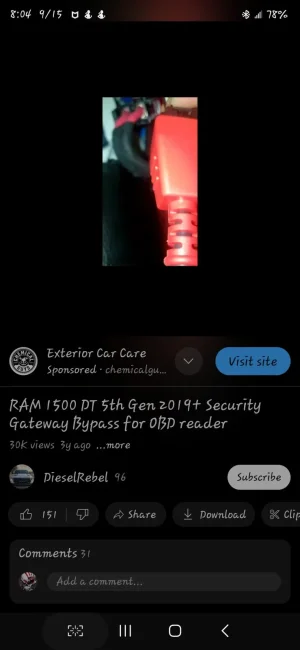
I hope I did this right and this is what you're looking for. I did not have a problem disconnecting my cable after watching this.


Attachments

  • Screenshot_20240915_080449_YouTube.webp
    Screenshot_20240915_080449_YouTube.webp
    43.1 KB · Views: 27
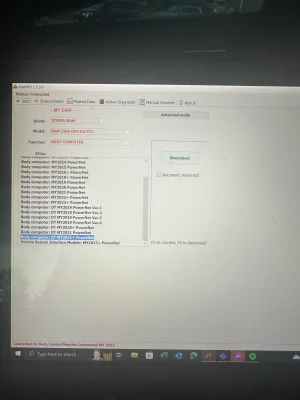
so where do I go from here? anyone? IT says connected, but no other options pop up. I tried to go to active diagnostics, but it stops there. Kind of just weird on where to go from here. I am using the ECRI model. Did order the pig tail to try this weekend, if that might be better...???
 

Attachments

  • IMG_3455.webp
    IMG_3455.webp
    88 KB · Views: 52
Never mind. I think I answered my own question I think. I actually need to press connect, and not F5...

So I still can't find the options on the PC verision of Alpha. I don't have anything listed to chose from like the day time running lights etc that was posted on page one of this thread.

you can see from the pic above what my options are. Not really sure what I'm doing wrong. Any suggestions?
Once you're connected you should see options in the active diagnostic tab for the module selected
 
Once you're connected you should see options in the active diagnostic tab for the module selected
I watched a few videos. I think I figured out my issue. off to try again...

thanks for the response.
 
I watched a few videos. I think I figured out my issue. off to try again...

thanks for the response.
Well I found all the stuff, do you need to do a 30 second key off after each value change? I did all of the changes, then turned the truck off for a min, but it didn't change the DRL's.

At least I made some progress, lol. I'll have to crash and try again tomorrow. The changes are showing up when I look at it AlphaOBD for what it's worth.
 
Well I found all the stuff, do you need to do a 30 second key off after each value change? I did all of the changes, then turned the truck off for a min, but it didn't change the DRL's.

At least I made some progress, lol. I'll have to crash and try again tomorrow. The changes are showing up when I look at it AlphaOBD for what it's worth.
Aren't the DRL's only when in gear? They stay white when parked I believe. I could be wrong and probably am.
 
Aren't the DRL's only when in gear? They stay white when parked I believe. I could be wrong and probably am.
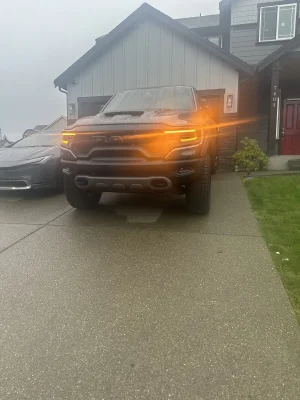
Not sure, but I just started it up, as the kids walking down the street wanted to hear it and it all works. So woo hoo! now on to mess with the chimes, and mirrors :D
 

Attachments

  • IMG_3473.webp
    IMG_3473.webp
    318.3 KB · Views: 51
so now that I know how to use alphaobd, it's pretty dope.

Changed the seatbelt chime to off, have the amber drl's, used the fuse to have the hood scoop lights always on, have the fog lights always on, and changed the auto tilt to be functional.

So my next 2 questions are, anyone actually been able to get the auto fold mirrors to work? As in when I turn the truck off, they fold in? I tried the settings in here, and it doesn't work.

Last question, for now, is there a way to have the truck always start in the custom mode? Wife want's it on her TRX to just always start in custom. I don't mind pushing the button, but also, why not always start in custom.

Thanks in advance all!
 
I just did it with alpha. it can be done. just in the instrument cluster setting like others have said.

I'm not sure why you quoted a post I made a year ago. At that point, there was not a known procedure with AlfaOBD. 🙄 Just a month and 12 posts later, I posted the procedure to turn it off with JScan and in the next post another member posted the AlfaOBD procedure.
 
anyone actually been able to get the auto fold mirrors to work? As in when I turn the truck off, they fold in? I tried the settings in here, and it doesn't work.
I have been told by many over on Ram forums that the functionality literally does not exist in our trucks’ computers. So although the option is there, it will never work. At least, with 2019 to 2024. The 2025s may be a different animal, as they have a different computer system, but that doesn’t help us TRX owners.
 
Has anyone had success accessing the COMFORT settings for the TRX via Alpha OBD?
 
Has anyone had success accessing the COMFORT settings for the TRX via Alpha OBD?
I read that someone managed that, trying it later today. it wont be through the BCM though so I am checking HVAC and other control units.
 
I read that someone managed that, trying it later today. it wont be through the BCM though so I am checking HVAC and other control units.

I do not think that the TRX has a Comfort Module accessible through AlfaOBD. Each individual temperature control module must be accessed individually, i.e. Driver Seat, Passenger Seat. Within each of those modules the temperature controls, (Automatic Temperature Control activation temperatures for venting & heating) cannot be accessed, a "Security Access Denied" message will be encountered. Other features may be accessible; I was able to activate and control PWM vent and heat test functions.

The 1500 forums have lots of people looking to change the ATC activation temperatures from 40F/80F to something else, but no one seems to have figured it out without dealer involvement, and even then, there seems to be some contention about whether a dealer will make those changes. I didn't look for the output control levels, whether heating or cooling initial application level can be modified.

If you figure it out, let us in on the secret!

 
I read that someone managed that, trying it later today. it wont be through the BCM though so I am checking HVAC and other control units.
I do not think that the TRX has a Comfort Module accessible through AlfaOBD. Each individual temperature control module must be accessed individually, i.e. Driver Seat, Passenger Seat. Within each of those modules the temperature controls, (Automatic Temperature Control activation temperatures for venting & heating) cannot be accessed, a "Security Access Denied" message will be encountered. Other features may be accessible; I was able to activate and control PWM vent and heat test functions.

The 1500 forums have lots of people looking to change the ATC activation temperatures from 40F/80F to something else, but no one seems to have figured it out without dealer involvement, and even then, there seems to be some contention about whether a dealer will make those changes. I didn't look for the output control levels, whether heating or cooling initial application level can be modified.

If you figure it out, let us in on the secret!
Select “comfort” and connect to the comfort seats and wheel module.
IMG_1650.webp

IMG_1651.webp

IMG_1648.webp

IMG_1649.webp
 

TRX Forum Favs 👍

Back
Top