-
Featured
- #281
Oops. My apologies, I missed that.
I see that you are using the windows version of AlfaOBD. I am using Android, the latest version of AlfaOBD, 2.4.0, and the OBDLinkMX+. Sooo...I got home and rushed out to try this. It did not work for me. I will try to get some screenshots up later. I also tried the OBDLinkEX via USB. I have tried two different Android devices. No luck.Yes. The change is represented in my photos.
4.4c is the original setting. I changed it to 4, procedure complete, click start again, and “option set currently as: 4° c”
Yes and got the error belowDid you try making a change?
Does it go through 4 can attempts then fail to connect?I see that you are using the windows version of AlfaOBD. I am using Android, the latest version of AlfaOBD, 2.4.0, and the OBDLinkMX+. Sooo...I got home and rushed out to try this. It did not work for me. I will try to get some screenshots up later. I also tried the OBDLinkEX via USB. I have tried two different Android devices. No luck.
You’re connected to the wrong module.Yes and got the error below
Will go through Jimmy's instructions again now.
Got it, will try again, Thanks Jimmy.Does it go through 4 can attempts then fail to connect?
You’re connected to the wrong module.
NoGot it, will try again, Thanks Jimmy.
While we are on the subject of comfort, is there a way to get the seat vent to start at the highest speed (3) rather then the lowest (1)?
Yes, I have turned it off in my TRX, i will get to the truck tonight and send the details if Jimmy doesn't beat me to itI know it's been asked, have we figured out the seatbelt warning chime yet?
Hope you can share this! I cant wait to fix this annoying chimeYes, I have turned it off in my TRX, i will get to the truck tonight and send the details if Jimmy doesn't beat me to it![]()
Start reading on page 7 of this thread, it starts there to disable with AlfaOBDHope you can share this! I cant wait to fix this annoying chime
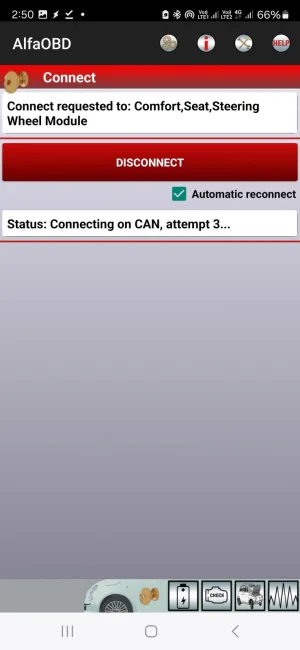
Yes, using the Android version. As far as I can tell the Android version will not connect to the Comfort module.Does it go through 4 can attempts then fail to connect?
You’re connected to the wrong module.
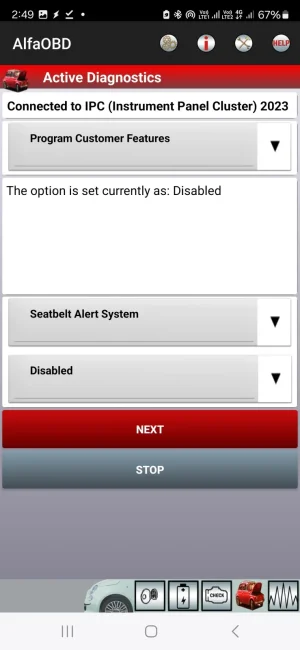
Here it is, connect to the instrument cluster, Seatbelt Alert system =Disabled.Hope you can share this! I cant wait to fix this annoying chime
Cannot connect to Comfort.Yes, using the Android version. As far as I can tell the Android version will not connect to the Comfort module.
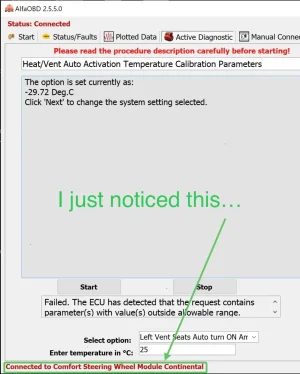
I went out and got he Windows version and now I have had a lot of success changing the temperatures and some other things within the Comfort module. I still get some odd results, though. For example, I was able to raise the temperature for heat activation, but I can't decrease the temperature for vent operation. AlfaOBD sometimes says the operation is complete, but when I later look there is a random number for the setting; right now the seat vent is activated at -29.72C and I cannot change it. I have tried changing some of the ramp and steady state temperatures...and that is, again, a total crapshoot. If I get a "Procedure Completed" message there are random numbers in the fields. If I do not get the procedure completed message then there can be an error message.
I'm open to suggestions!

What are the ramp and steady state?Yes, using the Android version. As far as I can tell the Android version will not connect to the Comfort module.
I went out and got he Windows version and now I have had a lot of success changing the temperatures and some other things within the Comfort module. I still get some odd results, though. For example, I was able to raise the temperature for heat activation, but I can't decrease the temperature for vent operation. AlfaOBD sometimes says the operation is complete, but when I later look there is a random number for the setting; right now the seat vent is activated at -29.72C and I cannot change it. I have tried changing some of the ramp and steady state temperatures...and that is, again, a total crapshoot. If I get a "Procedure Completed" message there are random numbers in the fields. If I do not get the procedure completed message then there can be an error message.
I'm open to suggestions!
Can you record a debug log while trying to connect, then send it to alfaobd and let him know he needs to fix that module for the android version.Cannot connect to Comfort.
Probably just conversion errors when he put these settings in. I can correctly change all of that stuff with cda.Yes, using the Android version. As far as I can tell the Android version will not connect to the Comfort module.
I went out and got he Windows version and now I have had a lot of success changing the temperatures and some other things within the Comfort module. I still get some odd results, though. For example, I was able to raise the temperature for heat activation, but I can't decrease the temperature for vent operation. AlfaOBD sometimes says the operation is complete, but when I later look there is a random number for the setting; right now the seat vent is activated at -29.72C and I cannot change it. I have tried changing some of the ramp and steady state temperatures...and that is, again, a total crapshoot. If I get a "Procedure Completed" message there are random numbers in the fields. If I do not get the procedure completed message then there can be an error message.
I'm open to suggestions!

Probably just conversion errors when he put these settings in. I can correctly change all of that stuff with cda.
Short video of connection error on Android, AlfaOBD v 2.4.1 (Nov 3., 2024).Cannot connect to Comfort.
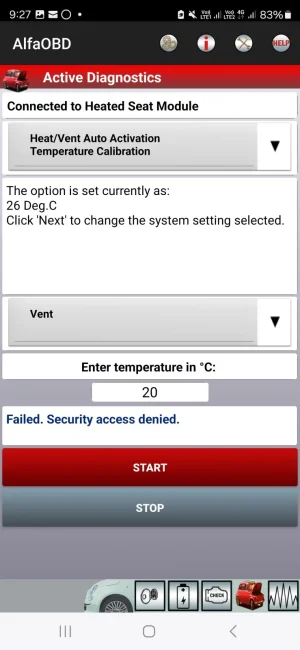
Hmmm. Quite frustrating. There mus be something simple that I am getting wrong. Here is today's error message:Probably just conversion errors when he put these settings in. I can correctly change all of that stuff with cda.
Via Android? I have both Windows and Android, but I have very limited experience with the Windows app.what are options are there for reading from the ECM/BCM directly?