AlfaOBD Tips and Tricks

I’ll go through them one by one:
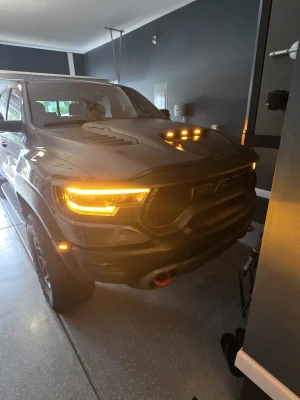
1) ECUConfig 3: DRL Customer Setting Option Present; Select value: Yes:
That one is irrelevant to a 5th gen bcm, and would be defaulted to yes anyway.

2) CBC Features: DRL Configuration; Select value: Optional DRL:
This should be “no drl” from the factory, and stays that way. There is no dedicated DRL circuit on the 5th gen bcm, so optional drl is irrelevant.

3) CBC Features: DRL Lamp Location; Select value: Turn Signal:
That one does get changed from low beam to turn signal.

4) CBC Features: DRL Dropout Enabled; Select value: Yes:
That one means that the corresponding DRL lamp will shut off when the turn signal is used. Since the turn signal itself is the drl, this setting is irrelevant.

5) CBC Features: LED Dedicated DRL Present; Select value: No:
Same as above- no dedicated DRL circuit, so irrelevant setting.

6) Cust.Set.Menu 1: Daytime running lights CSM Present; Select value: Yes:
That one is already set to yes on all US market rams (this is the setting that puts the drl toggle in the radio settings under lights).

7) Customer Program Features: Daytime Running Lamps ; Select value: Enabled:
All that setting does is toggles the drl on or off, just like you do in the radio settings.

Then there’s the missing setting that is not mentioned-
CBC Extern.Light Calibr.: Signature Light Present- NO
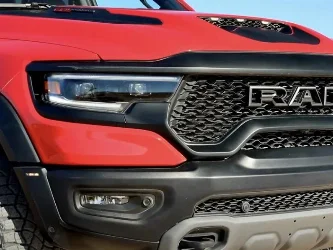
So, the upper and lower strips have two sets of LEDs in them- white and amber. Obviously the amber serve as the turn signals, and DRLs when configured that way. The white leds serve two purposes- signature lighting when the truck is running without the headlights on, and parking lights when the headlights are on.
If you don’t turn the signature lights off, they will be on in the background when amber DRLs are on. It will be hard to see because they are dim as signature lighting and the amber overpowers them, but they will still be running in the background.

Thanks for the explanation, got it done today...finally.
 

Attachments

  • 20240514_160411.webp
    20240514_160411.webp
    161.2 KB · Views: 56
Anyone know if this one works....? Adjusting auto-tilt angle/distance on side mirrors in reverse. I plan on trying it later today and will confirm and edit post.
Adjust how far down the mirrors tilt in reverse:
- For “function”, select driver door (instead of body computer). Select control unit "MY2019+", and connect (click continue when the box pops up talking about blue adapters).
- Select car with open hood icon in lower right (active diagnostic for windows version)
- Scroll down to Mirror Tilt Distance and select
- 40 is the default, so enter values lower than 40 to lessen the distance that the mirrors tilt down (I chose 20).
- Once procedure is complete, repeat the process for passenger door.
 
Anyone know if this one works....? Adjusting auto-tilt angle/distance on side mirrors in reverse. I plan on trying it later today and will confirm and edit post.
Adjust how far down the mirrors tilt in reverse:
- For “function”, select driver door (instead of body computer). Select control unit "MY2019+", and connect (click continue when the box pops up talking about blue adapters).
- Select car with open hood icon in lower right (active diagnostic for windows version)
- Scroll down to Mirror Tilt Distance and select
- 40 is the default, so enter values lower than 40 to lessen the distance that the mirrors tilt down (I chose 20).
- Once procedure is complete, repeat the process for passenger door.
Yes, it works, otherwise I wouldn’t have posted those instructions that were copied to here.
 
Anyone know if this one works....? Adjusting auto-tilt angle/distance on side mirrors in reverse. I plan on trying it later today and will confirm and edit post.
Adjust how far down the mirrors tilt in reverse:
- For “function”, select driver door (instead of body computer). Select control unit "MY2019+", and connect (click continue when the box pops up talking about blue adapters).
- Select car with open hood icon in lower right (active diagnostic for windows version)
- Scroll down to Mirror Tilt Distance and select
- 40 is the default, so enter values lower than 40 to lessen the distance that the mirrors tilt down (I chose 20).
- Once procedure is complete, repeat the process for passenger door.

Thanks for posting this. I had no idea the mirror angle could be adjusted. In the default mode, the tilt is useless.
 
Thanks for posting this. I had no idea the mirror angle could be adjusted. In the default mode, the tilt is useless.
Totally agree, default angle might as well point straight down. Copied from another forum, 5th gen rams I think. Jimmy07 can probly confirm which as it was his post I guess. Not enough alfaodb stuff in one spot.
 
Anyone know if this one works....? Adjusting auto-tilt angle/distance on side mirrors in reverse. I plan on trying it later today and will confirm and edit post.
Adjust how far down the mirrors tilt in reverse:
- For “function”, select driver door (instead of body computer). Select control unit "MY2019+", and connect (click continue when the box pops up talking about blue adapters).
- Select car with open hood icon in lower right (active diagnostic for windows version)
- Scroll down to Mirror Tilt Distance and select
- 40 is the default, so enter values lower than 40 to lessen the distance that the mirrors tilt down (I chose 20).
- Once procedure is complete, repeat the process for passenger door.

Anybody able to get this done? I tried it today and got an error that was something like “cannot be changed in active diagnostic”. But there was also a note on AlfaOBD about needing some blue adapter and verifying some pinouts if using a OBDlink MX+ which is what I was using so maybe my hardware doesn’t allow it.
 
Anyone know if this one works....? Adjusting auto-tilt angle/distance on side mirrors in reverse. I plan on trying it later today and will confirm and edit post.
Adjust how far down the mirrors tilt in reverse:
- For “function”, select driver door (instead of body computer). Select control unit "MY2019+", and connect (click continue when the box pops up talking about blue adapters).
- Select car with open hood icon in lower right (active diagnostic for windows version)
- Scroll down to Mirror Tilt Distance and select
- 40 is the default, so enter values lower than 40 to lessen the distance that the mirrors tilt down (I chose 20).
- Once procedure is complete, repeat the process for passenger door.
Setting to 10 on the driver door, 25 on the passenger door is the perfect solution for my needs. Works awesome.
Anybody able to get this done? I tried it today and got an error that was something like “cannot be changed in active diagnostic”. But there was also a note on AlfaOBD about needing some blue adapter and verifying some pinouts if using a OBDlink MX+ which is what I was using so maybe my hardware doesn’t allow it.
I did mine this afternoon. I’m using the EX cable though, left over from when I was using ForScan on old truck. I got the same error message but clicked through it. I’ll grab some screenshots of the Windows app tomorrow. I set my drivers side to 10, and passenger side to 25. Perfect for my needs.
 
Anybody able to get this done? I tried it today and got an error that was something like “cannot be changed in active diagnostic”. But there was also a note on AlfaOBD about needing some blue adapter and verifying some pinouts if using a OBDlink MX+ which is what I was using so maybe my hardware doesn’t allow it.
Can’t connect to the driver/passenger door ECU’s with my BAFX OBD interface either which has worked until now to change other settings on the Body and other ECU’s.

What OBD interface is recommended these days?
 
Can’t connect to the driver/passenger door ECU’s with my BAFX OBD interface either which has worked until now to change other settings on the Body and other ECU’s.

What OBD interface is recommended these days?
Cheaper interfaces can not connect to any ECU that has the adapter icon next to it without using the adapter.
IMG_0624.webp


You can only use vLinker MC+, MC, FD, OBDlink MX, MX+, or EX to connect to those ECUs without using an adapter.
 
Cheaper interfaces can not connect to any ECU that has the adapter icon next to it without using the adapter.
View attachment 129888

You can only use vLinker MC+, MC, FD, OBDlink MX, MX+, or EX to connect to those ECUs without using an adapter.

I’m using an OBDlink MX+ and it didn’t work for me. Gave an error about not being able to change it with “active diagnostic”. Using Windows version of AlfaOBD which uses the active diagnostic tab to make changes. Could just be me though cause I also had a heck of a time trying to get the tailgate open warning icons to work correctly.
 
Well, they’re the same spec LED chips as the signature/parking light strips, so how long are those on vs how long are the DRL turn signals are on. Probably same duty cycle.

For the power side steps:
CustSetMenu 2: Automatic Side Step CSM Present- YES
CustSetMenu 3: Power Side Step Enable/Disable CSM Present- YES
Will this button work for Amp power steps as well or only the mopar version?
 
I’ll go through them one by one:
1) ECUConfig 3: DRL Customer Setting Option Present; Select value: Yes:
That one is irrelevant to a 5th gen bcm, and would be defaulted to yes anyway.

2) CBC Features: DRL Configuration; Select value: Optional DRL:
This should be “no drl” from the factory, and stays that way. There is no dedicated DRL circuit on the 5th gen bcm, so optional drl is irrelevant.

3) CBC Features: DRL Lamp Location; Select value: Turn Signal:
That one does get changed from low beam to turn signal.

4) CBC Features: DRL Dropout Enabled; Select value: Yes:
That one means that the corresponding DRL lamp will shut off when the turn signal is used. Since the turn signal itself is the drl, this setting is irrelevant.

5) CBC Features: LED Dedicated DRL Present; Select value: No:
Same as above- no dedicated DRL circuit, so irrelevant setting.

6) Cust.Set.Menu 1: Daytime running lights CSM Present; Select value: Yes:
That one is already set to yes on all US market rams (this is the setting that puts the drl toggle in the radio settings under lights).

7) Customer Program Features: Daytime Running Lamps ; Select value: Enabled:
All that setting does is toggles the drl on or off, just like you do in the radio settings.

Then there’s the missing setting that is not mentioned-
CBC Extern.Light Calibr.: Signature Light Present- NO
So, the upper and lower strips have two sets of LEDs in them- white and amber. Obviously the amber serve as the turn signals, and DRLs when configured that way. The white leds serve two purposes- signature lighting when the truck is running without the headlights on, and parking lights when the headlights are on.
If you don’t turn the signature lights off, they will be on in the background when amber DRLs are on. It will be hard to see because they are dim as signature lighting and the amber overpowers them, but they will still be running in the background.
I am about to head out and try this on my truck, just one quick question.
I have a Canadian truck meaning my "DRL" are always on (white headlights) no radio setting to my knowledge.

Is there an additional setting to turn off the DRL headlights that are always on in the canadian market, or will simply setting DRL location to turn signals suffice?
In auto setting at night will signature lights stay yellow with hood markers etc turning on?

My goal is to have ONLY yellow signature lights during the day, then at night have the rest function normally with headlights while signature lights remaining yellow.

I probably should try it out before asking but, with something like this I would like to know everything before diving in.

Thank you very much in advance, very helpful information here.
 
I am about to head out and try this on my truck, just one quick question.

I have a Canadian truck meaning my "DRL" are always on (white headlights) no radio setting to my knowledge.

Is there an additional setting to turn off the DRL headlights that are always on in the canadian market, or will simply setting DRL location to turn signals suffice?
In auto setting at night will signature lights stay yellow with hood markers etc turning on?

My goal is to have ONLY yellow signature lights during the day, then at night have the rest function normally with headlights while signature lights remaining yellow.

I probably should try it out before asking but, with something like this I would like to know everything before diving in.

Thank you very much in advance, very helpful information here.
Mine (What are considered signature lights) are amber when I start the truck, when I turn the headlights on they are white. Always on setting for DRL was in truck settings under lights on mine. I had that set to off, and when I enabled #7 with alfa and checked, it was toggled on in the settings menu now. If you're DRLs are always on I would think just changing the location would do the same as mine. I don't think there's a way for them to be amber while headlights are on.
I still turn the knob to parking to get the hood lights on, not jumping fuses, I can turn a knob...lol
 
I can't help you connect your PC to the OBD2 link, but the SGW bypass goes here. Near the hood release cable, to the right of the canbus.

View attachment 111325
Okay I need some help. How in the hell do you unclip those ports and pull them out? Are they harder the first time? I feel like I'm going to break something. Any help is appreciated!! I want to program my steps! Thanks in advance
 
Okay I need some help. How in the hell do you unclip those ports and pull them out? Are they harder the first time? I feel like I'm going to break something. Any help is appreciated!! I want to program my steps! Thanks in advance

Are you pressing the release tabs on the top of the connectors? They can be a little stubborn, but if you push in on the connector, while pressing the release tab, it should unplug. It's almost like the little tab that holds the plug into the port has a barb on it and it won't release unless you apply pressure to it. Does that make sense?
 
Okay I need some help. How in the hell do you unclip those ports and pull them out? Are they harder the first time? I feel like I'm going to break something. Any help is appreciated!! I want to program my steps! Thanks in advance
Yes, they’re very tight the first few times you unplug them. And as said above, make sure to hold the clips when pulling.
 
Yes, they’re very tight the first few times you unplug them. And as said above, make sure to hold the clips when pulling.
Does the clip release push in, or pull out, to release?
 
Does the clip release push in, or pull out, to release?
Push in (in the middle of the side with the clips). It’s not terribly different from an RJ45 Ethernet plug, if you know that is. And keep in mind that there are two wire bundles, each of which comes out independently with their own connectors.
 
Push in (in the middle of the side with the clips). It’s not terribly different from an RJ45 Ethernet plug, if you know that is. And keep in mind that there are two wire bundles, each of which comes out independently with their own connectors.
ok...I'll try that in the morning.. Thanks!🇺🇲
 

TRX Forum Favs 👍

Back
Top