I have the Mopar power step. How would I go about adding this with AlfaOBD? Where do I go and what do I change? I am not familiar with this app and do not want to mess up any settings.
I have the Mopar power step. How would I go about adding this with AlfaOBD? Where do I go and what do I change? I am not familiar with this app and do not want to mess up any settings.
Theres some write ups and YouTube vids floating around but the crux of it is as follows: Open app and connect to your Bluetooth reader. Job #1 is to save your system ID, AND create a backup of your vehicle configuration BEFORE making any changes. That’s your fall back if you change something you aren’t supposed to.
Once that’s done, select and connect to the body control module for your model year. Then select “car configuration change” and search for “step”. These settings will appear in the search result list and need to be set as follows:
Cust.Set. Menu 2: Automatic Side Step CSM
Present: Yes
Cust.Set.Menu 3: Power Side Step Enable/ Disable CSM Present: Yes
Cabin Net: PSSM Power Side Step Module: Enabled
It’ll take several power cycles for Ucconnect step button to appear.
Theres some write ups and YouTube vids floating around but the crux of it is as follows: Open app and connect to your Bluetooth reader. Job #1 is to save your system ID, AND create a backup of your vehicle configuration BEFORE making any changes. That’s your fall back if you change something you aren’t supposed to.
Once that’s done, select and connect to the body control module for your model year. Then select “car configuration change” and search for “step”. These settings will appear in the search result list and need to be set as follows:
Cust.Set. Menu 2: Automatic Side Step CSM
Present: Yes
Cust.Set.Menu 3: Power Side Step Enable/ Disable CSM Present: Yes
Cabin Net: PSSM Power Side Step Module: Enabled
It’ll take several power cycles for Ucconnect step button to appear.
Theres some write ups and YouTube vids floating around but the crux of it is as follows: Open app and connect to your Bluetooth reader. Job #1 is to save your system ID, AND create a backup of your vehicle configuration BEFORE making any changes. That’s your fall back if you change something you aren’t supposed to.
Once that’s done, select and connect to the body control module for your model year. Then select “car configuration change” and search for “step”. These settings will appear in the search result list and need to be set as follows:
Cust.Set. Menu 2: Automatic Side Step CSM
Present: Yes
Cust.Set.Menu 3: Power Side Step Enable/ Disable CSM Present: Yes
Cabin Net: PSSM Power Side Step Module: Enabled
It’ll take several power cycles for Ucconnect step button to appear.
I have a 2023 and I want to confirm this worked exactly as needed with AlfaOBD for adding the Mopar Power Steps to the UConnect!
I selected Car Configuration Change and did those 3 items. They are near the bottom of the long list and written exactly as @OnTheReel wrote them. I did the 1st and hit start waited for it to say successful than did the 2nd. Than the 3rd. I than disconnected.
It only took 1 power cycle for it to appear in the Vehicle section for me to Fold or Unfold manually. Than in the settings section the option for Auto or Store appears as well!
I will add that you don’t have to scroll through all the options. You can search with key words that will get you at least close to the right setting, then make sure it matches exactly.
NO RETURNS - Due to excessive abuse by customers returning this item after use, we no longer accept returns of SGW bypass orders. Chrysler has introduced a Security Gateway Module (SGW/SGM), which blocks aftermarket programming from writing to your ECU. This bypass allows ECRI to calibrate your...
Will Ship 3-5 Business Days after OrderIf you have a 2018 - 2024 RAM and would like to perform diagnostics or make changes to the modules of your truck using tools like AlfaOBD or AutoEngenuity, this bypass is for you.Does this allow access to all modules?It has been tested connecting to the BCM...
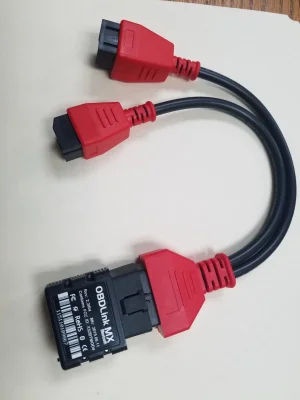
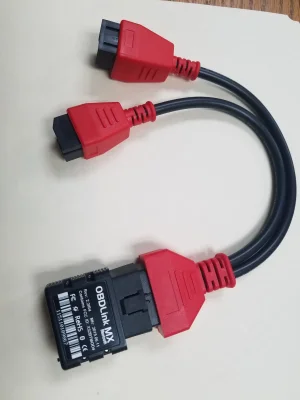
Why are you guys recommending expensive products that he doesn't need for Alfa? All anyone needs for Alfa to bypass the SGW with whichever OBD connector you're using is this $15 cable - https://www.amazon.com/gp/product/B08ZL4LRVK?tag=ramtrx05-20
I will confirm I used this cable and the old OBDLink MX as pictured below. Along with purchasing AlfaOBD. This is all I used. I plugged the 2 wires from the TRX to the red cable. Everything worked simple and easy.
Anyone figure out a slick way to always have the parking/marker lights on if the truck is running? I realize they come on with the headlights or I can turn them on with the knob, but I figured by now someone would have figured out a quick wiring job to make it happen automatically. ** Mod Edit...
Why are you guys recommending expensive products that he doesn't need for Alfa? All anyone needs for Alfa to bypass the SGW with whichever OBD connector you're using is this $15 cable - https://www.amazon.com/gp/product/B08ZL4LRVK?tag=ramtrx05-20
2023 using the wire below and the AlfaOBD app. I followed the original post 7 parts/steps for Amber DRL and it worked successfully. 2 of them actually stated I already had the same state and no change is necessary.
Hi. Does anyone know if you can change the fuel tank capacity using alpha obd? I have fitted a 205 Litre (54 gallon) fuel tank and the range to empty has not changed. Yet I am getting about 250 to 300 km’s more using the trip meter.
Hi. Does anyone know if you can change the fuel tank capacity using alpha obd? I have fitted a 205 Litre (54 gallon) fuel tank and the range to empty has not changed. Yet I am getting about 250 to 300 km’s more using the trip meter.
Not helpful, but would be interested in the tank, does it look OEM?
About AlfaOBD, you might just have to search through settings, in theory yes, because the trucks are fitted with different size fuel tanks, in reality that might just be two standard settings, not a number to adjust.


![TRX Aftermarket Wheel and Tire pics! [size/offset]](https://www.ram-trx.com/data/files/featured_images/featuredimages_thumb_1.webp?1792553543)