2023+ digital cluster swap (COMPLETE WRITE UP)

So through the course of doing these radio reflashes (which have worked great for everyone!), I have quite a few of these OEM Ethernet thingamabobs now. They do a great job holding the Ethernet plug into the radio securely. I wasn’t able to find any way to order them on their own so this is a good opportunity to get one if you’re doing a swap. I marked the port you need to use with yellow so it’s brainless. Send me a DM. $20 shipped.
IMG_1676.webp
IMG_1674.webp
IMG_1675.webp
 
Just completed stage 1 of this mod. Thank you! I was able to source a brand new 2024 cluster off eBay (68631940AB)and my original vin automatically married to the cluster. In JScan I can read the cluster miles/vin but it won’t complete odometer correction process. Has anyone figured out how to achieve this yet? Or is going to the dealer the only possible option.
 

Attachments

  • IMG_9483.webp
    IMG_9483.webp
    141.1 KB · Views: 61
Just completed stage 1 of this mod. Thank you! I was able to source a brand new 2024 cluster off eBay (68631940AB)and my original vin automatically married to the cluster. In JScan I can read the cluster miles/vin but it won’t complete odometer correction process. Has anyone figured out how to achieve this yet? Or is going to the dealer the only possible option.
As far as I am aware still not possible with JScan or Alfa, not even sure the dealer can do it. A friend of mine works for Cadillac he told me that when they replace a cluster, the new cluster will have mileage preprogrammed from GM when he gets the replacement.
 
Just completed stage 1 of this mod. Thank you! I was able to source a brand new 2024 cluster off eBay (68631940AB)and my original vin automatically married to the cluster. In JScan I can read the cluster miles/vin but it won’t complete odometer correction process. Has anyone figured out how to achieve this yet? Or is going to the dealer the only possible option.
@mac24attack is correct. It works the same for Ram as it does for GM. Dealers can’t do it and the truck won’t automatically pick up the mileage either. We are just in a holding pattern until someone figures it out.
 
If I had a 23 or 24 I would be trying to figure out how to get gauges back lol! To each their own, but you accomplished what you wanted and that's awesome, great job.
Im just like you. I love the analog gauges and am scared of a completely digital setup like the 23’s and 24’s
 
I just wanted to give Jimmy a huge shout out with helping me get these boards out there .
He was removing installing bcm multiple times disconnecting modules to reduce data analyzing .
This is his DT last night .
We got the PRND working too for the non TRX guys.
Is this module for PRND available? Please PM me the details, Thanks.
 
I did the short cut and bought the digital cluster from Infotainment. I have a 23 BCM programed by the dealer. Had a 23 UC5 already.
Apparently, the have a way to adjust the mileage on the cluster.20250617_170801.webp
Don't know where they get their clusters. Maybe factory with a core, I don't know.
 
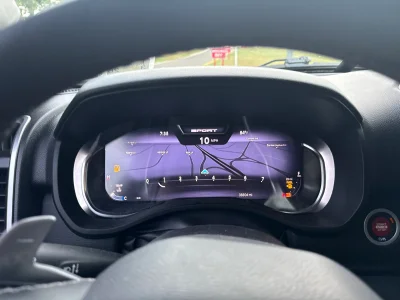
So, here is the take for your non TRX guys. I did install @skuppy069 can bus module to fix the missing P R N indicator. Install was easy, just plug and play, works like a charm (Factory). Now I have an absolute OEM cluster working with maps and tiles in my 2019 Ram.
 
So, here is the take for your non TRX guys. I did install @skuppy069 can bus module to fix the missing P R N indicator. Install was easy, just plug and play, works like a charm (Factory). Now I have an absolute OEM cluster working with maps and tiles in my 2019 Ram.
Good to hear! Waiting patiently for his can bus for the TRX 💪
 
Thanks skuppy069 for the modules. Now I have my maps and Park Sense cameras working, without having to upgrade to a 2023 BCM.
 
Thank you for the write up how I need to figure out how to stop the voice command any help with that?
 

Attachments

  • IMG_0967.webp
    IMG_0967.webp
    107 KB · Views: 42
I win!!!View attachment 118994
View attachment 118995
Still some minor things to iron out but I now have the 2023 BCM installed and working. Install cost me $170 and almost two hours of my life in the dealer lobby but I would have paid double that honestly.

They only questioned what I was doing because I was going out of pocket and the truck is still under warranty. I simply said I wanted it as a spare because I’m keeping the truck forever and I am building a parts stash. Which is mostly true, anyway. They didn’t seem to know or care that it was the wrong year BCM, or that I had previously configured it and took it out of plant mode before ultimately failing to link it to the RF hub.

Tiles now work as they should, with the small exception being that the tile button pulls up voice command in addition to bringing up the tiles. So it does two things at once. Minor annoyance because I can just clear it out on the infotainment screen and carry on as usual. Once the tile page is up it stays there, so if I leave it on that screen I will never have that conflict. But Jimmy is looking at my backup and we should be able to fix this some way or another. Even if it requires the 2023 radio I’m putting in anyway.

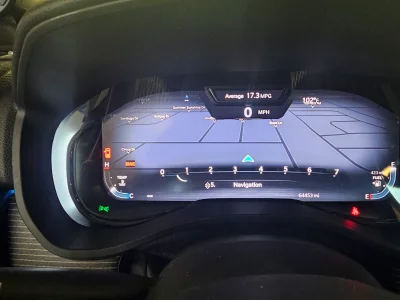
I also now get a blank map page in the cluster which means that function should work as soon as the radio/ UC5 swap is done. The 2021 BCM was not transmitting this feature.
View attachment 118996
Screen and 2023 CVPM are still on order so it may be a few weeks before stage 3. But I am pretty confident that we will get this working 100%, and that my TRX will be the first to do it. The BCM was the biggest hurdle and thankfully it’s good to go.

Where you able to fix the voice command issue cause I’m having the same issues
 
Where you able to fix the voice command issue cause I’m having the same issues
Did you change this:

ECUConfig 3: Unique Core Steering Wheel- Yes

That was the setting that stopped the voice command from popping up when pressing the tile button. This setting didn’t exist in AlfaOBD at that time so I wound up just comparing backup files from mine and a 2023 TRX and then manually loaded it after some experimenting.
 
Did you change this:

ECUConfig 3: Unique Core Steering Wheel- Yes

That was the setting that stopped the voice command from popping up when pressing the tile button. This setting didn’t exist in AlfaOBD at that time so I wound up just comparing backup files from mine and a 2023 TRX and then manually loaded it after some experimenting.
Yes it’s enabled but still pops up
 

TRX Forum Favs 👍

Back
Top