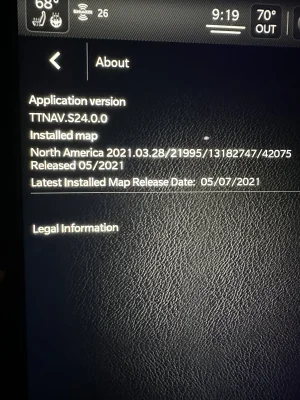
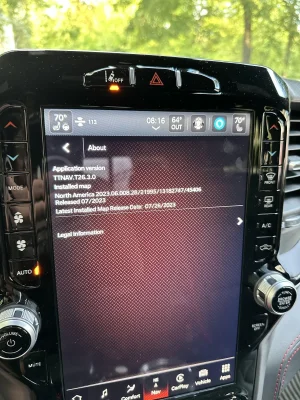
This is the version that is showing on my TomTom. My TRX is a 2022 that I have had since Feb. 2022. I also have the subscription. It seems different RAM Connect people give completely different answers since I was told that the version # will never change and it is always being updated as you drive. I also have my truck connected into our Wi-Fi network when it is parked in our driveway, so does anybody have any thoughts on what you are seeing below in my attachment? Thanks
I guess I can understand using standard Nav, if your without cell service a lot...
Other than that, I've found almost all factory Nav is total shit..... My last 4 brand new cars, show my neighborhood as a green field...
My house is 12 years old.
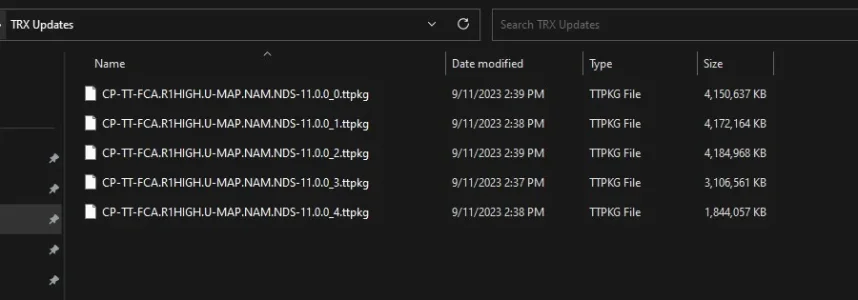
Couple of tips: Make sure your thumb drive is formatted for FAT32 (not exFAT). And - it's not really apparent on the download site, but there are 9 total files to download. You should end up with a list of files that looks like this on your thumb drive.
Was curious, I was able to download the .ttpkg files with no problem. The first three files , when I click on download, a bunch of words pop up on the screen but nothing downloads. Instead, I copied the download file and pasted to the thumbdrive. Looks just like on your list. The only file I dont see is the download file at the bottom. Is that a necessary file to be able to update? Sorry if I don't make sense but thank you for any help you may have.
Was curious, I was able to download the .ttpkg files with no problem. The first three files , when I click on download, a bunch of words pop up on the screen but nothing downloads. Instead, I copied the download file and pasted to the thumbdrive. Looks just like on your list. The only file I dont see is the download file at the bottom. Is that a necessary file to be able to update? Sorry if I don't make sense but thank you for any help you may have.
I just left my truck engine off and in the on position by hitting the button twice without my foot on the brake. Plugged the usb in and went in the house. Took about 30 minutes or so to update.
I just left my truck engine off and in the on position by hitting the button twice without my foot on the brake. Plugged the usb in and went in the house. Took about 30 minutes or so to update.
obviously you did not have any negative affects to the update? I have a '21, and the map needs to be updated for sure in my opinion. But I also am simply using the standard factory map set up.
obviously you did not have any negative affects to the update? I have a '21, and the map needs to be updated for sure in my opinion. But I also am simply using the standard factory map set up.
I feel like an idiot, but I downloaded the 5 needed files per the previous thread, and made sure my flash drive is FAT32. I plugged it into each one of my 3 USB ports in my truck and nothing happened. Is there a special port I need to plug it into? Is there a waiting period for it to pop up on the screen so I can download?
I feel like an idiot, but I downloaded the 5 needed files per the previous thread, and made sure my flash drive is FAT32. I plugged it into each one of my 3 USB ports in my truck and nothing happened. Is there a special port I need to plug it into? Is there a waiting period for it to pop up on the screen so I can download?
Was the truck on?
Were the files the only thing on the flash drive?
Either USB port below the screen should work. A window should pop up about 10 seconds after you plug the drive in.
I feel like an idiot, but I downloaded the 5 needed files per the previous thread, and made sure my flash drive is FAT32. I plugged it into each one of my 3 USB ports in my truck and nothing happened. Is there a special port I need to plug it into? Is there a waiting period for it to pop up on the screen so I can download?
Make sure you choose master boot record and not guid partition table when you format it. It won't work if guid partition table is selected. Might of been a fluke but thats what I had to do to get it working.