Can’t. Sales code is not available to add.Dumb question...has anybody tried to do this using Witech II?
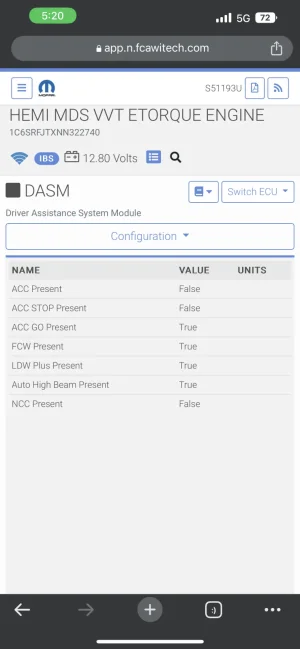
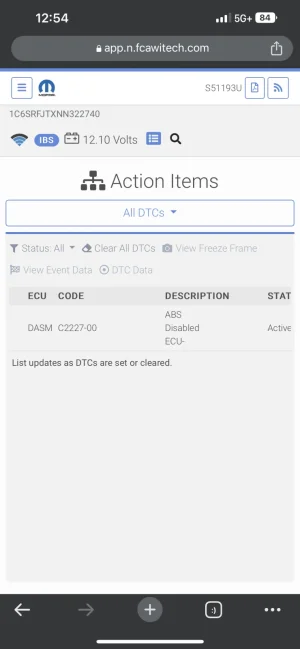
Did you swap out the abs module and HCU for the correct ones? Non-TRX rams do not come with the ACC capable abs module and HCU if they are not factory equipped with ACC.So I’m at a issue with adding ACC to my 22 Laramie. Figured I’d come here for help. The write up was very nice and on point. But after trying and redoing the steps I’m still running into a problem. Acc unavailable. Btw i am a service tech at a dodge dealer. And if we have to update or change a component, and we do a vehicle configuration restore. It will wipe out everything programmed in. Anywho, everything works as it should. Until the abs disables the dasm. I’ve read and seen the trx abs module may be different than a non-trx. Seeing if i can get any input on this. I’ll attach a screenshot. Me and my coworkers have been trying to figure this out. We’re on a mission haha. If you go into the abs module and do anything that makes the abs talk and work. Acc works as it should. As soon as you come out of it. Back to Acc unavailable.
I haven’t done that yet. But when you go into the abs configuration. ACC is set to True. And ACC works IF you are in the abs module. And doesn’t if your not. That’s what has us baffled.Did you swap out the abs module and HCU for the correct ones? Non-TRX rams do not come with the ACC capable abs module and HCU if they are not factory equipped with ACC.
What’s the part numbers for the abs module and HCU that are currently installed on the truck? There has never been a non TRX owner that hasn’t had to change those in order to get ACC added and working.I haven’t done that yet. But when you go into the abs configuration. ACC is set to True. And ACC works IF you are in the abs module. And doesn’t if your not. That’s what has us baffled.
I’ll look in the morning. And I’m sure the TRX ABS & HCU is on back order just like everything else haha.What’s the part numbers for the abs module and HCU that are currently installed on the truck? There has never been a non TRX owner that hasn’t had to change those in order to get ACC added and working.
While ACC equipped TRX’s and non-TRX’s share HCU part numbers, they don’t use the same ABS module.I’ll look in the morning. And I’m sure the TRX ABS & HCU is on back order just like everything else haha.
Thank you for the info and part numbers. I’ll get with our parts guys tomorrow and see what i can get.While ACC equipped TRX’s and non-TRX’s share HCU part numbers, they don’t use the same ABS module.
These are the part numbers you need:
ABS module- 68436462AI (possibly superseded by now)
HCU- 68415320AA
Thanks for this info @tfoteh! I just ordered that part (68526526AA @$48) for my '23 TRX. And thanks for the instructions @RobsTRX, I just ordered all the components as per your recommendations and should be getting everything by the beginning of June (the switch will take the longest to get to me). I'll report back once I have it all done!For those of you wondering if this works for 2023, I just successfully installed and programmed the adaptive cruise in my 2023. Mopar eparts store claimed that the 68309592AD switch everyone has been using til now is not compatible with the 2023, maybe there's just a new part number for 2023, but I didn't wanna risk it, and the pictures and descriptions on the parts site led me nowhere.
I saw that there were two switches available that work in my 2023, 68526526AA @$48 and 68526525AA @$71. The pictures suck and the descriptions say nothing about adaptive cruise, and you would assume that the more expensive one is what you need, so I decided to check the existing part number that came with the truck and order the opposite one. To my surprise, it was the cheaper one, part# 68526526AA
View attachment 95477
After getting it all installed, I hooked up AlfaOBD, which was recently updated. I selected (MY2022+) and it recognized it as a 2023 body computer. I first set Cruise to "no" and Set ACC to "Acc with stop and go" I then restarted the truck and noticed that the buttons were not working and I was getting some warning lights. I reset the ECU in AlfaOBD and it all worked perfectly. Went for a test drive and it's pretty cool. It brakes and everything. No issues. Works as it should. Thanks to @PotterTRX 's youtube video and @RobsTRX for the instructions in the thread.
'
View attachment 95478View attachment 95479View attachment 95481View attachment 95482View attachment 95483
No worries! I did two round trips for work from Houston to Austin this past month, works perfectly. I don’t think the forward collision warning with braking was there before I did the mod, ( I could be wrong) but that works also.Thanks for this info @tfoteh! I just ordered that part (68526526AA @$48) for my '23 TRX. And thanks for the instructions @RobsTRX, I just ordered all the components as per your recommendations and should be getting everything by the beginning of June (the switch will take the longest to get to me). I'll report back once I have it all done!
I have to start by thanking the people who helped get me here. Taylor potter for making the switch install video and going far enough with it to show it will actually work and for me the member DUSM that helped by showing what prompts in the program were changed to make it happen. I actually have to thank my RAM dealer because if they didn't suck so fully I may not have had the drive to prove them wrong and start fiddling with my ECU. Something I know nothing about
Now that I know how to do it it's really simple. I will provide links and photos below
Installing the switch
Watch potters install of the switch. It's very straight forward. He did an outstanding job with the video. For me I found that I just needed to be patient fiddling around to get to the tabs to release the air bag the rest was easy. Listen to what he has to say. You need to come threw the holes in the steering wheel at a slight angle to get them. I'm really mechanically sharp and it frustrated me. I actually used a Philips screw driver. Take your time with this project. Worst case scenario any local garage could install the switch.
The programming. For a lot of us this is unchartered waters
You will need to buy a OBD link MX+ and a security bypass (links below). The security bypass has 4 plugs. One gets plugged to the OBD port one has what will be your new OBD port that you will plug the OBD mx to and 2 small plugs that get plugged into 2 different circuit boards under the dash. (No worries the adapter comes with good instructions, its a snap to install) I had a fellow member tell me a good hint. Remove the tabs that hold the 2 small plugs in. (Photo below). It's not a terrible spot to get the plugs into but getting them out would be tuff and there's no reason to keep it attached after your done. You'll see this immediately as you do it.
Then do not make the mistake of trying to use the software that comes with the OBD link. Like I did. You must download and buy alphaobd, link below. Its the key. Once the program is loaded follow the instructions on the alpha obd website to buy and activate the program. Easy peezy. Support is quick to respond if you have issues [email protected].
After you have activated the program go to the first tab "start" Put your vehicle information in and you will need to connect to the OBD link. Click on connect. (shown in photo1) a box comes up with the link on it. select it (photo 2) once that is done the program starts the connection to your truck and when it's good on the upper right hand side of the screen the red status will go from idle to connected
Next you want to go to the tab status/faults. You want to be sure the tab save log is checked. There's nothing worse than making an error and not remembering what you changed. just below that theres 2 tabs that bring up the changes you have made (photo 3)
The programming, click on the tab "active diagnostics". Its the one that has he car hood up, click on the open box and you get a drop down. Go all the way to the bottom. There are 2 important items. the first is car configuration change and ECU reset. To make the necessary changes click on car configuration changes. If you screw up and can't figure out what you did wrong by going back to the log you can use the ECU reset to start fresh (like I did 2x) (photo 4 below)
When you click on car configuration you will get a search box, type in cruise control and the cruise control parameter will come up. Under that it will give you to option to turn it on or off. It will be currently on, you need click it to off (photo 5) then hit the start prompt just above it. It will tell you when it's done.
Next search ACC and the adaptive cruise control will come up, change the setting to ACC with stop and go. Like before press start and the changes will be made and the program tells you when it's complete (Photo 6) Don't put the truck in drive to test it. (I have been tole the cruise has to be off before turning on the ACC) I made that mistake and it sets off the collision avoidance system. Shut it off and allow the setting to take in the computer. The program says to wait 30 sec. I actually got out and allowed the truck to go dark. Then fire it up and your ready to go. Remember if you have an issue, at the bottom of the list just under control settings is a ECU reset if you screw up. No worries. I had to do it 2X.
When it's all said and done my dealer said he would do it for $175 and decided not to and waste my time. He said it's not possible. I can tell you I'm a techno nothing and got it. In any case you can do it yourself for close to that, in less time then it takes to deal with them and have the satisfaction of giving the dealer noting but the middle finger.
I'd like to say I appreciate this forum and what it brings to me and others. I'm glad to contribute!!
![]()
OBDLink MX+
The OBDLink® MX+ is the top-of-the-line OBD II scan tool to use with forscan and comes with bluetooth. Get one here today and gain access to your vehicle!www.obdlink.com
![]()
Security Module Bypass | KaodTech
Will Ship 3-5 Business Days after OrderIf you have a 2018 - 2024 RAM and would like to perform diagnostics or make changes to the modules of your truck using tools like AlfaOBD or AutoEngenuity, this bypass is for you.Does this allow access to all modules?It has been tested connecting to the BCM...www.kaodtech.com
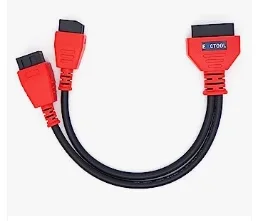
That's not what I used when doing this. I have the link to the kit in the description then I never cam across a prompt to disable anything and to my knowledge nobody that followed the instructions did.Installed the adaptive cruise control switch in a 2021 that already had the correct DASM with radar. Used AlphOBD with a bypassed cable to set cruise control to no and type of adaptive cruise control to yes with stop and go. Was prompted by the truck to wipe the radar sensor, which I did, and everything looked like it was going to work. Turned off the ignition, waited for the ecu to turn off, then turn the ignition back to run. I now have an error message on the dash the says forward collision detection is off, cruise control and adaptive cruise control is disabled, and service is required. Set everything back, I get no warnings, but cruise control will not work. I did use a different cable than you show here. Photo of cable is attached. Do you have any recommendations?
That cable is fine. Is your truck a TRX? If it is not a TRX, did you replace the abs module and hydraulic control unit with the correct part numbers?Installed the adaptive cruise control switch in a 2021 that already had the correct DASM with radar. Used AlphOBD with a bypassed cable to set cruise control to no and type of adaptive cruise control to yes with stop and go. Was prompted by the truck to wipe the radar sensor, which I did, and everything looked like it was going to work. Turned off the ignition, waited for the ecu to turn off, then turn the ignition back to run. I now have an error message on the dash the says forward collision detection is off, cruise control and adaptive cruise control is disabled, and service is required. Set everything back, I get no warnings, but cruise control will not work. I did use a different cable than you show here. Photo of cable is attached. Do you have any recommendations?
No, I did notThat cable is fine. Is your truck a TRX? If it is not a TRX, did you replace the abs module and hydraulic control unit with the correct part numbers?
Should i try it with the cable shown in the write up?That's not what I used when doing this. I have the link to the kit in the description then I never cam across a prompt to disable anything and to my knowledge nobody that followed the instructions did.
I can tell you that I had to do it a couple of times to get it on my first one.
Time for a do over
I only replaced the switch on the steering wheel.No, I did not