- Joined
- Mar 19, 2024
- Messages
- 173
- Gallery
- 26
- Reaction score
- 185
- Location
- Boston Area
- Current Ride
- 2022 RAM 1500 TRX
Yes, it's a one time use USB drive that's locked. Did mine about a year ago. Had to order it from FCA.Yes. I’m not sure how it is done with UC4 (there’s something about a license file that is required).
Holy cow, man, you just replied to a 3-1/2 year old post!Yes, it's a one time use USB drive that's locked. Did mine about a year ago. Had to order it from FCA.
Thanks, that's exactly what I did. I'm trying a different USB drive.Thanks for the post. Updated my maps today no issues. Fat32 formatted with nothing else on the drive. Open the zip file and transfer all the individual files to the USB drive not the full zip file. Plug in USB….installed update in about 30 min. Hope that helps.
i also updated mine last weekend with no issues. I just extract the zip file and then copy all the files to a zip drive
I'm using the #1 USB port and the truck is on, but the engine is off. Still having the same issues.Which USB slot did you use? Was the TRX's engine on or just the power on (run)?
I'm using the #1 USB port and the truck is on, but the engine is off. Still having the same issues.
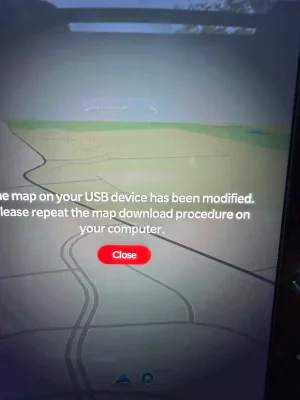
I put 8 files on a USB stick formatted in MS-DOS Fat32. My truck was on run, without the engine runnning, and I used the USB slot #1 . The system recognized the drive and asked to start the update. Then I got the error message about the drive being modified and I need to re-download the map. I did try a different browser for the download and will attempt to update later. I use a Mac and Safari. I'm using Chrome on my Mac for the new download.We need @Kdsprecher or @Quietpeen to chime in to confirm that your method is the same method they used. Hopefully they will confirm...
I just downloaded and will try later today and let you know. I used Chrome on a typical USB drive.I put 8 files on a USB stick formatted in MS-DOS Fat32. My truck was on run, without the engine runnning, and I used the USB slot #1 . The system recognized the drive and asked to start the update. Then I got the error message about the drive being modified and I need to re-download the map. I did try a different browser for the download and will attempt to update later. I use a Mac and Safari. I'm using Chrome on my Mac for the new download.

I put 8 files on a USB stick formatted in MS-DOS Fat32. My truck was on run, without the engine runnning, and I used the USB slot #1 . The system recognized the drive and asked to start the update. Then I got the error message about the drive being modified and I need to re-download the map. I did try a different browser for the download and will attempt to update later. I use a Mac and Safari. I'm using Chrome on my Mac for the new download.
I did not. I will try that. thank you.
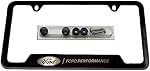
I deleted that file and still got the same error message. Here is what I'm using.
I deleted that file and still got the same error message. Here is what I'm using.View attachment 159053
Thanks for the info. I've done all that. I'm trying on a PC versus a Mac this time. When you say to copy and paste files out of the zip folder back to the main folder, what exactly do you mean? I just copied the extracted files from my PC to the USB drive, which is formatted FAT32.
It was the Mac. I got it to work. Thank you!!To ensure that the zip file itself is not on the USB stick. Only the files that were contained within the zip file should be on the USB stick.
Maybe it was the Mac issue, i would actually put my money on that.