New screen with update?

The technical service bulletin lists the symptoms and fixes for U29.44. This is not a customer-facing document, so we realize it may be confusing, but the list applies to all vehicles including the TRX; the "without TRX badge" is meant to indicate the TRX vehicles post-pause.

We have engaged the software engineering team to request a separation between any symptoms that are solely addressed in the second update to U35.36. Our understanding as of now is that the majority of these items are in the U29.44 update, which DOES include TRX customers. There is no difference in that update between the different vehicle lines. The mention of "without TRX badge" is not referencing the U29.44 update that all of the trucks received (or were meant to receive).

Diamond
Ram Cares
 
IMG_9606.gif
 
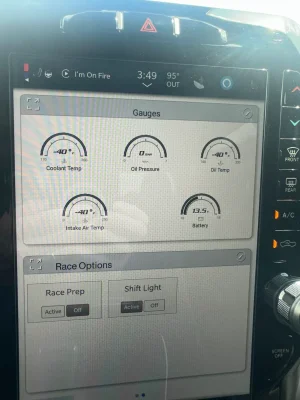
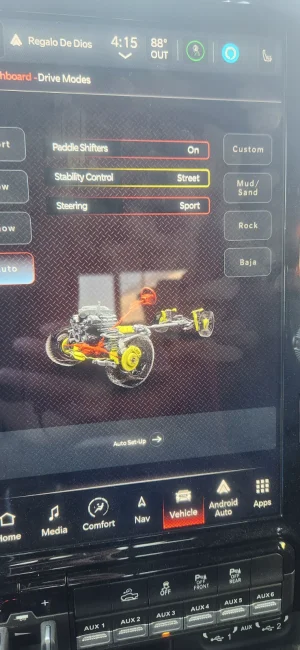
We wanted to provide another update to everyone. The development of another update to fix the items including (but not limited to) the incorrect RHO graphics, incorrect/glitching gauges, and inability to properly choose sport mode are underway. We have not been provided with timing yet to share for a deployment, so we do apologize that that is not yet available. Anyone who wants to provide their VIN to us is welcome to do so still -- but as a reminder, you do not have to share your VIN. We request them in private messages to protect your privacy. If there is anything that has changed that you would like to share, we will also gratefully accept any additional feedback that needs to be shared with the corporate engineers.

Diamond
Ram Cares
Can I provide you my VIN? I just got the stupid update over the weekend and have the RHO graphic as well and my Custom drive mode wont save
 
Yea. My custom drive selections won’t save either.
No sport transmission mode in custom etc…
 
My screens are fu&*ing up again. It worked for a few days but now the gremlins are back. This is getting really annoying.
 
Yeah, Started mine up today and I don't even know what drive mode it was in. The drive mode button on my main screen didn't work, just crashed after I pressed it. Dug through the menus and found the drive modes and changed it back to auto for my daily driving.
 
Following this - just noticed the update in my truck yesterday. Have an RHO drive train now, no air fuel gauge or boost gauge at all
Very disappointing
Are they still pushing this "stuff" out? Hope it's the new (fixed) load. If not, that says a lot about how they feel about their customers. IMO.
 
Stellantis really messed up the CDJR brands. It is a zombie corporation complex now. The corporate undead.
 
Are they still pushing this "stuff" out? Hope it's the new (fixed) load. If not, that says a lot about how they feel about their customers. IMO.
Mine is showing a version of 29.44, which is the problematic update. I’m having all the symptoms complained about in this post

Very frustrating
 
Mine is showing a version of 29.44, which is the problematic update. I’m having all the symptoms complained about in this post

Very frustrating
Get used to it they're never going to fix it it's been almost 2 months now
 
I don’t know if this is a symptom from this update either, but twice now my proximity with my key has not worked. If I click the unlock it works fine; have to hold the fob on the column to start the truck

It does this once then everything works perfectly fine. Battery in fob is good
 
Ronald Reagan once said : the nine most terrifying words in the English language are: "I'm from the Government, and I'm here to help".

If he owned a RAM truck: He may have said instead: the nine most terrifying words in the English language are, "At RAM Trucks, We Built it, We Back it".
 
Uconnect 5 never fails to amaze me.
 

Attachments

  • IMG_9677.webp
    IMG_9677.webp
    171.4 KB · Views: 54

TRX Forum Favs 👍

RAM-TRX Vendors

justboltons.com BwoodyPerformance.com Granger Chrysler Jeep Dodge RAM solisracinggroup.com Mark Dodge.com Forced Induction Interchillers RealTruck.com Ourisman Cars
Back
Top