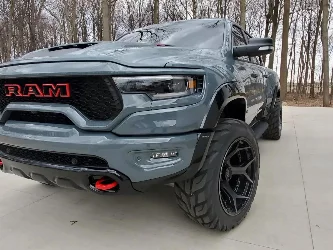
Tazer DT

Needs to be married to work.

You do not have to unmarry to change settings in uConnect. I am not sure on setup for non-USA based trucks however we were able to set up ambers on one of my Canadian customer's truck without doing anything with uConnect.

All amber DRL setup is performed in live settings now if you have the latest firmware (18.1.5)
So do I reset the vehicle settings I changed or just leave it. I changed drl to usa and drl location to turn then activated the live settings to day
 
Any news on adjusting tire size and park sense still working? Honestly bout to toss this thing in the trash. Been really glitchy, things randomly turning off like TPMS.
Tire size is a RAM issue. The BCM will not calibrate the park sensors to anything above 35". Not a Tazer issue. Tire change feature for Tazer works without any issue in non-park sensor equipped trucks. Until RAM updates the calibration parameters with their park sensors, you will not be able to use them if you change tire size above 35".

The Tazer's are a simple solution to unlocking features that are already in our trucks but disabled for various reasons by RAM. The Tazer can only be as stable as uConnect is and we all know how bad uConnect sucks. Because of this, it can be glitchy at times.

If you are having issues, I will do my best to try and help get it resolved. Just let me know what its doing (or not doing).
 
Tire size is a RAM issue. The BCM will not calibrate the park sensors to anything above 35". Not a Tazer issue. Tire change feature for Tazer works without any issue in non-park sensor equipped trucks. Until RAM updates the calibration parameters with their park sensors, you will not be able to use them if you change tire size above 35".

The Tazer's are a simple solution to unlocking features that are already in our trucks but disabled for various reasons by RAM. The Tazer can only be as stable as uConnect is and we all know how bad uConnect sucks. Because of this, it can be glitchy at times.

If you are having issues, I will do my best to try and help get it resolved. Just let me know what its doing (or not doing).
Ugh that’s frustrating but guess there’s not much we can do. Would like to have it calibrated.

As far as other issues, I’ll get in and randomly have no TPMS. Without doing any changes, unmarrying or unplugging. It’s forced 2WD once but that was in the very beginning and hasn’t happened since. Turncam would auto turn on as well but I think that’s a live feature I turned off? These are the ones on top of my head
 
20220515_120841.webp
 
Loving my Tazer so far. Does anyone know if they've come up with the fix for the Park camera to turn on the front camera yet? that's mostly why I bought it in the first place.
 
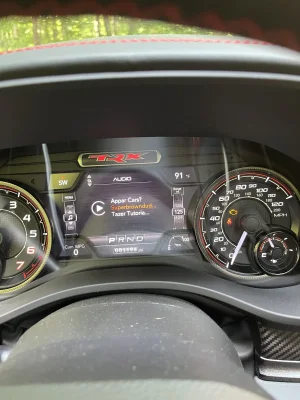
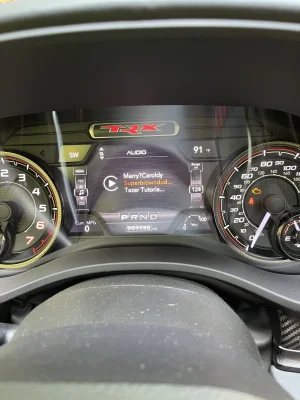
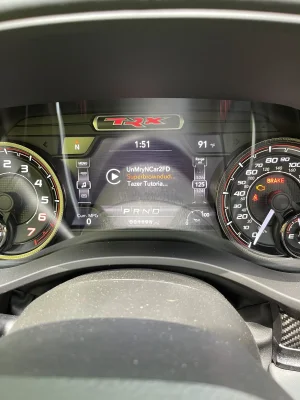
So I started to install my Tazer today but it was acting very “buggy” so I decided to not continue until I read a little more. Didn’t want to get myself in any issues I couldn’t figure out.

The menu was very laggy and the menu names weren’t spelled right. Some were, and then some weren’t. Then sometimes the menu would correct the spelling itself.

When I watched the you tube vids, their Tazers weren’t acting anything like this. Pic attached.

Plus, my YouTube video titles were being displayed below the Tazer menu which isn’t something I saw from the install vids.

And I do have the 18.5.1 software installed. Any ideas on what this is or if I should just ignore and keep going?
 

Attachments

  • F0965544-96EB-4831-9A09-0D16AD0E1F14.webp
    F0965544-96EB-4831-9A09-0D16AD0E1F14.webp
    178.9 KB · Views: 63
  • ED9D0FA2-EBEB-4340-81F6-F8168128E197.webp
    ED9D0FA2-EBEB-4340-81F6-F8168128E197.webp
    182 KB · Views: 69
  • AE0E0829-50A6-4EE2-85B1-D8F6BC7AC375.webp
    AE0E0829-50A6-4EE2-85B1-D8F6BC7AC375.webp
    186.3 KB · Views: 65
So I started to install my Tazer today but it was acting very “buggy” so I decided to not continue until I read a little more. Didn’t want to get myself in any issues I couldn’t figure out.

The menu was very laggy and the menu names weren’t spelled right. Some were, and then some weren’t. Then sometimes the menu would correct the spelling itself.

When I watched the you tube vids, their Tazers weren’t acting anything like this. Pic attached.

Plus, my YouTube video titles were being displayed below the Tazer menu which isn’t something I saw from the install vids.

And I do have the 18.5.1 software installed. Any ideas on what this is or if I should just ignore and keep going?

Click the volume button on the screen to turn it off, you need to turn off that and it will be a bit better. I ran into the same issue a few pages back :P
 
So I started to install my Tazer today but it was acting very “buggy” so I decided to not continue until I read a little more. Didn’t want to get myself in any issues I couldn’t figure out.

The menu was very laggy and the menu names weren’t spelled right. Some were, and then some weren’t. Then sometimes the menu would correct the spelling itself.

When I watched the you tube vids, their Tazers weren’t acting anything like this. Pic attached.

Plus, my YouTube video titles were being displayed below the Tazer menu which isn’t something I saw from the install vids.

And I do have the 18.5.1 software installed. Any ideas on what this is or if I should just ignore and keep going?
Thats actually normal. The uconnect seems to overwrite the tazer menus. Sometimes you are lucky and can clearly read them, sometimes not. Disable the music playing (or switch to a purely static FM frequency) and it will likely help you to set the settings. If you can't read it, move to the next menu and roll it around till you get the right one.
 
Thanks to both of you guys above. As long as it’s not a sign that the Tazer isn’t working right, I’ll try again. Thanks!
 
Thanks to both of you guys above. As long as it’s not a sign that the Tazer isn’t working right, I’ll try again. Thanks!
As mentioned, turn your stereo/deck/audio system/radio/12"monitor completely off using the button in the center of the volume button. :cool:
 
Thanks everyone.

Did the marry and changed the features I wanted already. Mainly DRL’s, Park Cam, and mirrors.

I’m almost positive I re booted correctly. But is there a way to tell to make sure The Tazer doesn’t drain the battery? Will the light stay on?
 
Thanks everyone.

Did the marry and changed the features I wanted already. Mainly DRL’s, Park Cam, and mirrors.

I’m almost positive I re booted correctly. But is there a way to tell to make sure The Tazer doesn’t drain the battery? Will the light stay on?
Remember to let it sleep twice after the full reboot. Just remember to wait 60 seconds after the screen turns off after the reboot, then after each of the two sleep cycles.
 
Remember to let it sleep twice after the full reboot. Just remember to wait 60 seconds after the screen turns off after the reboot, then after each of the two sleep cycles.
Yep, did that.

After you reboot and sleep twice, then change some Live settings, do you need to do the reboot again?

The way I read is the reboot was after the non live settings, then after starting and changing lice settings, you don’t need to reboot. Am I right or am I just a terrible reader?
 
Yep, did that.

After you reboot and sleep twice, then change some Live settings, do you need to do the reboot again?

The way I read is the reboot was after the non live settings, then after starting and changing lice settings, you don’t need to reboot. Am I right or am I just a terrible reader?
You read it correctly. I don't change the live features on mine, so I have no experience there to let you know how well that works.
 
You read it correctly. I don't change the live features on mine, so I have no experience there to let you know how well that works.

Cool. I hadn’t planned on changing live features but I figured it wouldn’t hurt anything. I do like the hood ambers, so that’s a nice add. The mirrors and park cam are stuff I can live without. Hopefully leaving the Tazer installed for live features won’t cause me any issues.
 
Cool. I hadn’t planned on changing live features but I figured it wouldn’t hurt anything. I do like the hood ambers, so that’s a nice add. The mirrors and park cam are stuff I can live without. Hopefully leaving the Tazer installed for live features won’t cause me any issues.
The mirrors I do use. They have always worked out of the box for me, but that might have changed in the latest revision. The park cam does not work properly for me. FWIW, it causes my uconnect to freeze and have to be rebooted. With that disabled though, everything works well.
 
Yep, did that.

After you reboot and sleep twice, then change some Live settings, do you need to do the reboot again?

The way I read is the reboot was after the non live settings, then after starting and changing lice settings, you don’t need to reboot. Am I right or am I just a terrible reader?
Live settings do not require reboot or sleep cycles.
 
Has anybody else noticed their amber DRL's blink when the windshield wipers are on?? I happened to be parked and facing an office building. And while I was admiring my beast in the reflection, I decided to clean my windshield. As the fluid hit and the wipers came on, I saw my DRL's start blinking and was like "WTF?".
 

TRX Forum Favs 👍

Latest Discussions...

RAM-TRX Vendors

justboltons.com BwoodyPerformance.com Granger Chrysler Jeep Dodge RAM OffRoadAlliance.com/ solisracinggroup.com Mark Dodge.com Forced Induction Interchillers RealTruck.com Ourisman Cars
Back
Top