It’s been posted about occasionally but thought an official thread would help. This process removes all connection to the outside world. No more OTA updates, tracking, ads or connected services / Ram app. You can still retain GPS navigation and SiriusXM radio, as well as all the other normal functions such as Bluetooth, CarPlay, etc...
Completing this process AND installing a used radio running older software is currently the only resolution for those experiencing all of the Uconnect issues over the last year. If you delete telematics without replacing the radio you’re just locking yourself into whatever software you’re on now.
Finding a Ram radio running a software version T27.46 or below is going to be a challenge at this point but I will list the part numbers anyway:
2022 only: 68504644AA-AG
2023-2024 (also works fine in 2022s): 68583503AA-AE
Essentially radio would need to be a used unit from a truck that was dismantled before these rounds of OTA updates hit earlier this year. Alternatively, on occasion I have units available which I program to operate exactly like a Ram radio including correct TRX graphics.
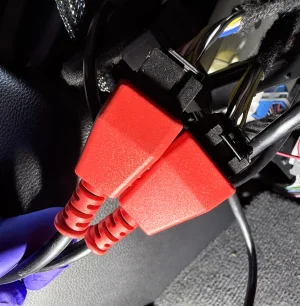
In addition to a new (old) radio you’ll need this jumper cable to retain GPS/ SXM:
https://a.co/d/jfB9Quw
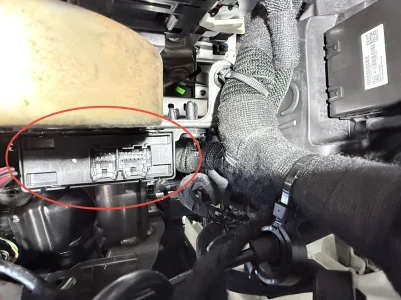
For the hardware side of things you will need to remove center stack, lower glovebox, and upper glovebox to gain access to the TBM. I am attaching the service data for disassembly.


Once you gain access, unplug everything from the box and use the new jumper cable to connect the brown and blue Fakra connectors together. Everything else can be tied back.
The one bolt holding the TBM in is a bitch to reach but overall it’s not a bad process. I am hoping that folks who do this can supply pics and share their experiences here but for now, this is all I have.
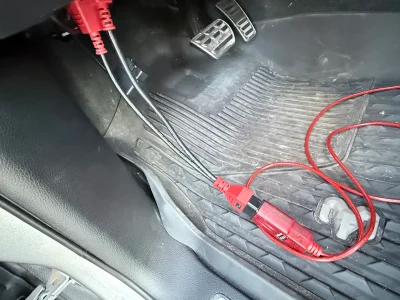
After the TBM is removed, we just need to tell the truck it is no longer there. I used the PC version of AlfaOBD and an OBDLINK EX for the sake of the screen recording but you can use the Android version and a Bluetooth adapter just the same. If you’re new to this you’ll need to first go under the dash and locate the SGW module. Unplug the two connectors and plug them into an SGW bypass harness, then plug your OBD interface into that.
I go through connecting to the BCM and changing every setting in the video, but will also list them here with the original settings and the changes to make in bold print.
Under ECUconfig 18:
TBM (Telematics Box Module) Audio Config: Type 1
Cell Present: No
Wifi Present: Yes (CHANGE TO NO)
Assist Call Button Configuration: Remote - HU (Head Unit) (CHANGE TO NO)
GPS Present: Yes (CHANGE TO NO)
ECALL Button Configuration: Virtual (CAN/LIN) (CHANGE TO NO)
TBM (Telematics Box Module) Second Generation: Yes (CHANGE TO NO)
ACN Hardwired: No
External Speaker Present: No
External LTE Diversity Antenna: Yes (CHANGE TO NO)
Remote Headlights Feature: No
USB Connection Present: Yes (CHANGE TO NO)
Geolocalization Menu Present: No
Connected Services Present: Yes (CHANGE TO NO)
Sound Zone Present: No
Under Cabin Net:
EAM/TBM Emergency Assistance Module: Enabled (CHANGE TO NOT ENABLED)
That completes the programming.
For bonus points…if you really want to remove all visible traces of connectivity, you can even install the overhead console that doesn’t have the assist and SOS buttons since they won’t do anything anymore.
Completing this process AND installing a used radio running older software is currently the only resolution for those experiencing all of the Uconnect issues over the last year. If you delete telematics without replacing the radio you’re just locking yourself into whatever software you’re on now.
Finding a Ram radio running a software version T27.46 or below is going to be a challenge at this point but I will list the part numbers anyway:
2022 only: 68504644AA-AG
2023-2024 (also works fine in 2022s): 68583503AA-AE
Essentially radio would need to be a used unit from a truck that was dismantled before these rounds of OTA updates hit earlier this year. Alternatively, on occasion I have units available which I program to operate exactly like a Ram radio including correct TRX graphics.
In addition to a new (old) radio you’ll need this jumper cable to retain GPS/ SXM:
https://a.co/d/jfB9Quw
For the hardware side of things you will need to remove center stack, lower glovebox, and upper glovebox to gain access to the TBM. I am attaching the service data for disassembly.
Once you gain access, unplug everything from the box and use the new jumper cable to connect the brown and blue Fakra connectors together. Everything else can be tied back.
The one bolt holding the TBM in is a bitch to reach but overall it’s not a bad process. I am hoping that folks who do this can supply pics and share their experiences here but for now, this is all I have.
After the TBM is removed, we just need to tell the truck it is no longer there. I used the PC version of AlfaOBD and an OBDLINK EX for the sake of the screen recording but you can use the Android version and a Bluetooth adapter just the same. If you’re new to this you’ll need to first go under the dash and locate the SGW module. Unplug the two connectors and plug them into an SGW bypass harness, then plug your OBD interface into that.
I go through connecting to the BCM and changing every setting in the video, but will also list them here with the original settings and the changes to make in bold print.
Under ECUconfig 18:
TBM (Telematics Box Module) Audio Config: Type 1
Cell Present: No
Wifi Present: Yes (CHANGE TO NO)
Assist Call Button Configuration: Remote - HU (Head Unit) (CHANGE TO NO)
GPS Present: Yes (CHANGE TO NO)
ECALL Button Configuration: Virtual (CAN/LIN) (CHANGE TO NO)
TBM (Telematics Box Module) Second Generation: Yes (CHANGE TO NO)
ACN Hardwired: No
External Speaker Present: No
External LTE Diversity Antenna: Yes (CHANGE TO NO)
Remote Headlights Feature: No
USB Connection Present: Yes (CHANGE TO NO)
Geolocalization Menu Present: No
Connected Services Present: Yes (CHANGE TO NO)
Sound Zone Present: No
Under Cabin Net:
EAM/TBM Emergency Assistance Module: Enabled (CHANGE TO NOT ENABLED)
That completes the programming.
For bonus points…if you really want to remove all visible traces of connectivity, you can even install the overhead console that doesn’t have the assist and SOS buttons since they won’t do anything anymore.